
Skip to content
Wolzenburg Consulting
Migration as a Service

Complex Atlassian migrations, done right.

We move your Jira and Confluence environment from Data Center to Cloud — including the parts where standard tools give up: automation, assets, structure, filters and permissions. Thorough, transparent, every result checked against the Data Center original.

  • Data Center → Cloud
  • Tested on staging, live after validation
  • Purpose-built tools
migration — dc → cloud
$ migrate scan --deep
# scanning automation, assets & structure …✓ findings detected — each logged with its location
$ migrate fix --apply (staging)
✓ results validated on staging✓ references relinked — ready for go-live
The problem

Moving the tickets is the easy part

The native migration path moves projects, issues and attachments to the cloud reliably. On grown Data Center instances that only gets the easy part done. The real work begins with everything that quietly breaks afterwards.

Most migrations do not fail at moving the tickets, but at what is broken afterwards.

Automation

Rules migrate as raw text. Field, status and user references point nowhere. A rule shows green and still does nothing.

Our tool AutomationMigrator checks every rule against its original in Data Center and repairs the silent breaks — with a log for each finding. Learn more

Assets / Insight

Object schemas, field contexts and issue references break. AQL queries and asset fields lose their reference.

Our tool AssetMigrator and Asset Relink fully restore objects, fields and contexts in the cloud. Learn more

Filters & JQL

Saved filters, board and dashboard queries point to Data-Center-internal fields and IDs that no longer exist in the cloud.

Our tool The assessment surfaces dead filters and JQL queries; the structure tools carry filters and views across cleanly. Learn more

Structures

Structure permissions and saved views are not carried over by the official path — they have to be rebuilt by hand.

Our tool StructureMigrator carries permissions and saved views board-accurately to Structure for Cloud. Learn more

Your own fields

Fields with no screen entry, scripted fields and translations fall through the cracks of the native path.

Our tool FieldTranslationMigrator and CustomFieldMerger carry fields, translations and duplicates across cleanly. Learn more

Permissions

Project roles, permission schemes and app permissions arrive incomplete, role memberships are missing.

Our tool PermissionSync and the JMH repair kit reconcile roles and permission schemes scheme by scheme. Learn more

A green automation rule is a claim, not a proof. From the field

The result is a project that formally "ran through" and then needs adjusting in countless places in operation. The difference between a migration that runs through and one that works lies exactly in these details.

Migration as a Service

A migration that handles the hard cases too

Most migrations don't fail at moving the tickets — they fail at what breaks afterwards. That is exactly where we come in: we take on the technically demanding parts end to end, as a service, with clear checkpoints along the way.

No data loss

Every step is transparent and repeatable: first tested on staging systems, results validated, then the go-live — never blindly.

Depth, not surface

Automation, ScriptRunner, Assets/Insight, Structure, filters, dashboards, permissions: the areas a standard migration leaves behind.

With purpose-built tools

A proven family of tools — united in the Jira Migration Manager — automates analysis and repair, from the read-only assessment to per-project automated rework. The effort-and-cost calculator shows the difference from manual work, from your real instance.

How the migration runs

1

Analysis

A full scan of Data Center and Cloud. We find what will break after the migration — before it does.

2

Migration

Moving content and configuration, aligned with JCMA and the specifics of your environment.

3

Repair

Automation, assets, structure and the rest are fixed on staging and verified against the Cloud — with Managed Migration running automatically per finished project.

4

Go-live

Sign-off, live migration after approval and handover with a report. You know exactly what happened.

In focus

The platform and its specialist tools

Two things carry a migration: a platform that holds everything together, and tools that bite exactly where it gets hard.

Platform

Jira Migration Manager

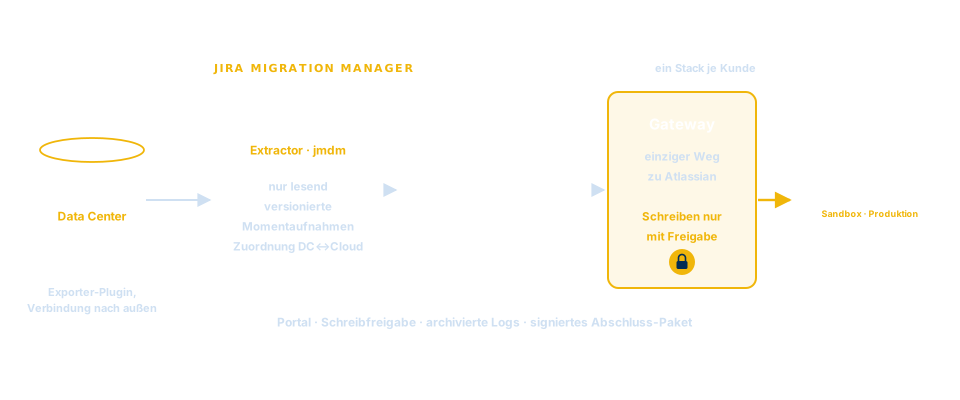
Every tool runs in the same isolated stack per client: a read-only layer pulls Data Center and Cloud into a versioned snapshot, the tools work on it, and every change goes through a single, controlled write path.

  • One isolated stack per client, in our own data centre
  • Read and write strictly separated — controlled and logged
  • Every tool in one place — usable on its own, strong together
To the platform
Platform architecture: Jira Data Center with exporter → Jira Migration Manager (one stack per client, data layer, gateway) → Jira Cloud
Assets / Insight

The asset family

Insight/Assets is the most demanding part of a Jira migration. Three tools interlock: rebuild, reconnect, keep in sync — until the object world stands complete and verified in the cloud.

  • AssetMigrator — Build assets
  • Asset Relink — Assets Migration
  • AssetSync — Sync assets
See the asset tools

AssetMigrator

Asset Relink

AssetSync

Structures

StructureMigrator

The official migration path for Structure for Jira transfers the board hierarchies — but not who may see them or with which view. StructureMigrator closes exactly that gap, board by board and verified against Data Center.

  • Permissions and saved views transferred board by board
  • Users and project roles automatically mapped to their Cloud counterparts
  • Trial run before every write step, existing Cloud boards stay untouched
To StructureMigrator

At a glance

Permissions Saved views Project roles Board-accurate Checked against Data Center
Service Management

RequestType Sync

When moving between JSM cloud instances, request types often arrive incomplete or different. RequestType Sync reconciles them rule-based — including forms and translations, with a trial run before every write step.

  • Forms and request type translations migrated in full
  • Issue view, text, icons, portal groups and access kept in sync
  • Trial run before writing, approval required
To RequestType Sync

At a glance

Forms Translations Issue view Text & icons Portal groups Access Screen layout
Fields & translations

Fields and translations, complete in the cloud

Custom field and status translations are among the things left behind by a standard migration. Two tools bring them fully into the cloud — with a mapping straight from the Extractor API instead of guessing names.

  • FieldTranslationMigrator — Field translations
  • StatusTranslationMigrator — Status translations
See the field tools

At a glance

Field translations Status translations All languages Extractor-API mapping
How we guide your migration

From assessment to documented proof

Four steps, four solid deliverables — assess, quote, execute, prove. Each step leaves something tangible in your hands.

1

Assessment

Before anything moves, you know what's coming.

A read-only assessment of your instance rates every point by migration effort — green moves along, amber needs review, red is real manual work. The result is a readable assessment, not an endless raw-data list.

Learn more
2

Quote & cost

From findings to a transparent quote.

From the assessment we calculate effort and cost from the real instance — line by line, with and without tooling. This shows where automation saves effort. The result is a transparent quote we refine together with you at project start.

Learn more
3

Guided execution

The migration step by step — through to sign-off.

From your real data we produce a plan for the move: sequence, check points, points to roll back to and a clear list of the rework no standard tool does automatically.

Learn more
4

Proof of results

In black and white: what arrived?

After the migration, a report per object type and project: source checked against target, status at a glance, open points named plainly instead of glossed over — the basis for formal sign-off.

Learn more

Assess → Migrate → Prove

How we work

Three separate stacks — from first test to production

You don't rehearse a serious migration in production. That's why we typically set up three fully separate environments — each with its own Data Center and Cloud target, each with full logging across all runs.

  1. 1 Data Center test ↔ Cloud sandbox

    Test migrations

    The stack for the first runs: prove feasibility, tune the tools, measure scope and effort from real data — with no risk to any production system.

  2. 2 Data Center test ↔ Cloud pre-prod

    Preparation & sign-off

    The stack for going green: everything is prepared for go-live and verified again and again — including testing, UAT and formal sign-off by your team.

  3. 3 Data Center prod ↔ Cloud prod

    Production

    The final stack for the real move: the same long-rehearsed steps — only now on the production systems, approved and logged step by step.

Three stacks, one continuous record: every run in every environment is logged and traceable. A professional setup instead of migrating on hope.

The controlled process

Nothing is written before it is simulated, checked and approved

Every migration follows the same flow: read and simulate first, then check against the Data Center original — and write only after your approval.

  1. 1

    Analysis

    A read-only assessment shows before the first step where the migration gets demanding.

  2. 2

    Extract

    A versioned, read-only snapshot of Data Center and Cloud as the shared basis.

  3. 3

    Trial run

    Every writing step is fully simulated first — without anything happening in the cloud.

  4. 4

    Verification

    The result is checked against the Data Center state. Only when it matches the original does a step count as sound.

  5. 5

    Approval & write

    You approve, then writing happens through a single, controlled write path — at a throttled write rate, without writing anything twice, fully logged.

Sandbox first: as a rule, migration and verification run against a sandbox before the production migration is approved.

No AI in the migration run: the core works fully rule-based and repeatable. The same input state leads to the same result — today and in three months.

A migration is only done when the complicated parts work again — not just the tickets.
Wolf Wolzenburg
What sets us apart

Verifiable down to the source

What matters is that you can rely on the outcome. Every statement about your migration is documented and verifiable at any time — you know where you stand up front, and you can prove success beyond doubt afterwards: to the business, to audit and to management.

Always the same result

No model guesses, nothing is estimated. The same instance yields the exact same result today and in three months — deterministic, as the technical term goes: rule-based, repeatable, with no AI in the migration run.

Traceable

Every finding is evidenced down to the source: where the problem sits, why it is one and what is done about it — finding by finding, not a blanket assurance.

Logged end to end

Every analysis, trial run and write produces a complete record. Who changed what and when stays traceable at any time — right down to the revision level.

Measured, not estimated

Scope and effort come from your real instance, counted exactly — not from experience values or rules of thumb. A quote you can actually check.

What you hold in your hands at the end

  • Pre-migration assessment from your real instance
  • Solid effort and cost estimate — measured, not guessed
  • Runbook for migration day
  • Verification log for every step
  • Final report with locations and open follow-up work

The questions you should be asking

Do you use AI in the migration run?
No. The core is entirely rule-based. AI may assist in preparation, but no model decides what gets written into your cloud — otherwise the result wouldn't be the same every time.
Where does our data sit during the migration?
Your content never leaves your systems — it stays exclusively on your Data Center and Cloud instances. What sits with us, if anything, is only metadata and the mapping keys (Data Center ID ↔ Cloud ID) — in an isolated stack just for you, in our own data centre, with no third-party cloud in between.
What happens if a run breaks off?
Nothing uncontrolled: every write is logged and safeguarded so that nothing is ever written twice — an aborted run can simply be repeated. If something fails fundamentally, you get a findings report at assessment quality.

We show plainly what's achievable — and solve considerably more than the native standard path. Evidenced, traceable, repeatable with the same result every time.

Consulting & programmes

From vision to work package

Migration is rarely the whole story. We plan and steer complex IT initiatives end to end — from strategy to delivery, technically grounded and governance-safe.

Programme & project setup

Vision, roadmap and work packages — programmes and projects cleanly structured, steered and taken through to business as usual.

Architecture & governance

Target and current-state architectures (TOGAF, ArchiMate), decision papers and viable governance for cloud and operations.

GDPR & compliance

Data protection, data security and regulatory requirements considered from the start — through to ISO 27001 topics.

ITSM/ITIL & adoption

Service management per ITIL, change and adoption — so the new solution not only runs but gets used.

By the numbers

years in IT transformation & migration
15+
every tool in the Jira Migration Manager
One platform
every write checked in advance against the original in Data Center
Trial run first
specialisation
Data Center → Cloud
From practice

Projects we're working on right now

Four anonymised migration projects — and the scope that shows why the native path falls short here. Figures rounded, with no inference about the client.

Mechanical engineering, international

~3,300 users · ~250 projects · ~500,000 issues

Scope

  • ~480 automation rules
  • ~30 asset schemas with ~470 object types
  • ~1,100 custom fields
  • ~600 JSM queues
  • ~130 workflows

A grown Data Center landscape with Service Management and Assets across several entities — fully to the cloud.

Retail & purchasing group

~3,300 users · ~70 projects

Scope

  • ~200 automation rules
  • ~12 asset schemas with ~270 object types
  • ~30 permission schemes
  • ~21 issue-security schemes
  • ~610 custom fields

Data Center with Service Management and Assets — fully analysed and assessed before the migration.

Software vendor, international

~40 projects

Scope

  • ~210 automation rules
  • ~790 filters
  • ~310 custom fields
  • ~90 request types

Many filters and automations relative to the number of projects — preparing the cloud migration.

Food retail group

2 Data Center instances · ~270 projects

Scope

  • ~840 filters
  • ~430 workflows
  • ~350 custom fields
  • ~200 dashboards
  • ~80 automation rules

Two Data Center instances with many projects and workflows are being analysed for the cloud migration.

The figures describe the scope that has to move to the cloud cleanly — rounded and anonymised. None of these has gone live in production yet; we show what is, not what reads well.
Security & operations

Your migration runs in our own data centre

No third-party cloud, no shared host: all tools run on our own dedicated hardware — fully separated per mandate and secured to the current state of the art.

Your content stays with you

Content data never leaves your systems — it stays exclusively on your Data Center and Cloud instances. What sits with us, if anything, is only metadata and the mapping keys (Data Center ID ↔ Cloud ID).

Own data centre

All tools run in our own data centre on dedicated hardware — separate from everything else, with no third-party cloud provider in between.

Linux & BSD

Operated entirely on hardened Linux and BSD systems — lean, transparent and with no unnecessary attack surface.

CrowdSec & modern security

Secured with CrowdSec and state-of-the-art security technology: active intrusion detection, hardening and continuous monitoring.

Isolated per mandate

Each mandate runs fully separated on dedicated hardware used only for it — no mixing of client data.

CrowdSec M1 M2 M3

Every mandate gets its own fully separated environment — shielded by CrowdSec.

About

Wolf Wolzenburg

I specialise in Atlassian migrations from Data Center to Cloud — and especially in the technically demanding cases many shy away from. One person who runs the migration personally: where others wave it off, I build the tool that solves the job.

Behind the migration stands a trusted advisor for digital transformation: 15+ years of international programme and project leadership, as much at home with Microsoft 365, Azure and the Power Platform as with Atlassian. Cleanly documented, proven on staging, with no nasty surprises on go-live day.

  • Data Center → Cloud

    migration focus

  • Hands-on

    own code & APIs

  • Validated

    before go-live

Wolf Wolzenburg

Wolf Wolzenburg

Atlassian Migration Expert · Wolzenburg Consulting

"A migration is only done when the complicated parts work again too — not just the tickets."

Let's talk
Contact

Migration on the horizon? Let's talk.

Whether it's a full migration or just the tricky leftovers: describe your case in a few lines — we'll get back to you with an honest assessment.

Usually a reply within one business day.